Lifting with an Apple Watch should mean fewer trips to your phone between sets. In practice, most workout apps still expect you to tap through a tiny screen with chalky fingers. We compared the strength-training apps worth knowing in 2026 on one question: how well do they let you train from your wrist?
Full disclosure: we make TalktoFit, and it’s on this list. We’ve tried to be fair — every app here is one we’d recommend to a friend for the right person. Prices are US App Store prices checked on October 21, 2026, and vary by country.
The short version: if you want to log sets by voice, with barely a tap, and get an AI coach that plans with you, TalktoFit is our pick. If you don’t want to pay, get Hevy. If your phone stays in the locker, get SmartGym.
Quick picks
| App | Best for | Logs sets on watch | Without iPhone | Yearly (US) |
|---|---|---|---|---|
| TalktoFit | Voice logging + AI coach | Yes, by voice or finger gesture | No | $89.99/yr |
| Hevy | A free logger | Yes | Yes | Free · Pro $23.99/yr |
| Strong | Fast tap logging | Yes | Yes | Free · Pro $29.99/yr |
| SmartGym | Standalone watch app | Yes | Yes | Free · $59.99/yr |
| Fitbod | AI-planned workouts | Yes | No | $95.99/yr |
| Gymaholic | Budget, watch-first | Yes | Yes | $31.99/yr |
| Apple Workout | Heart rate and rings | No | Yes | Free |
| Ladder | Coach-built programs | Unclear | Unclear | $179.99/yr |
How we picked
Apple’s own Workout app tracks heart rate and calories during a strength session, but it doesn’t record exercises, sets, reps or weight. For that you need a third-party app, and on the wrist the differences between them are bigger than on the phone. We looked at:
- Logging mid-set: can you record a set on the watch, and how many taps does it take?
- Independence: does the watch app work with your phone in a locker?
- The basics on the wrist: heart rate, a rest timer and what’s next.
- Progression: does the app help you add weight or reps over time? (More in our progressive overload guide.)
- Coaching: does it help you decide what to train, or only record it?
- Price: what’s free, and what the subscription costs.
TalktoFit: best for voice logging and AI coaching
- Best for
- Lifters who’d rather say the set than tap it in, and want an AI coach that plans with them
- On the watch
- Voice logging, double-tap finger gesture to complete a set, progressive overload, coach suggestions, heart rate, rest timer, music controls
- Price
- Free download; TalktoFit Pro $9.99/month or $89.99/year (new subscribers may get a free trial)
TalktoFit is built around one idea: you shouldn’t have to type a workout. Tap the mic and say “Just did lat pulldown, 10 reps at 65 kilos” and the set is logged — on your iPhone or on your Apple Watch. You can fix or remove sets the same way, and one sentence can make several changes.
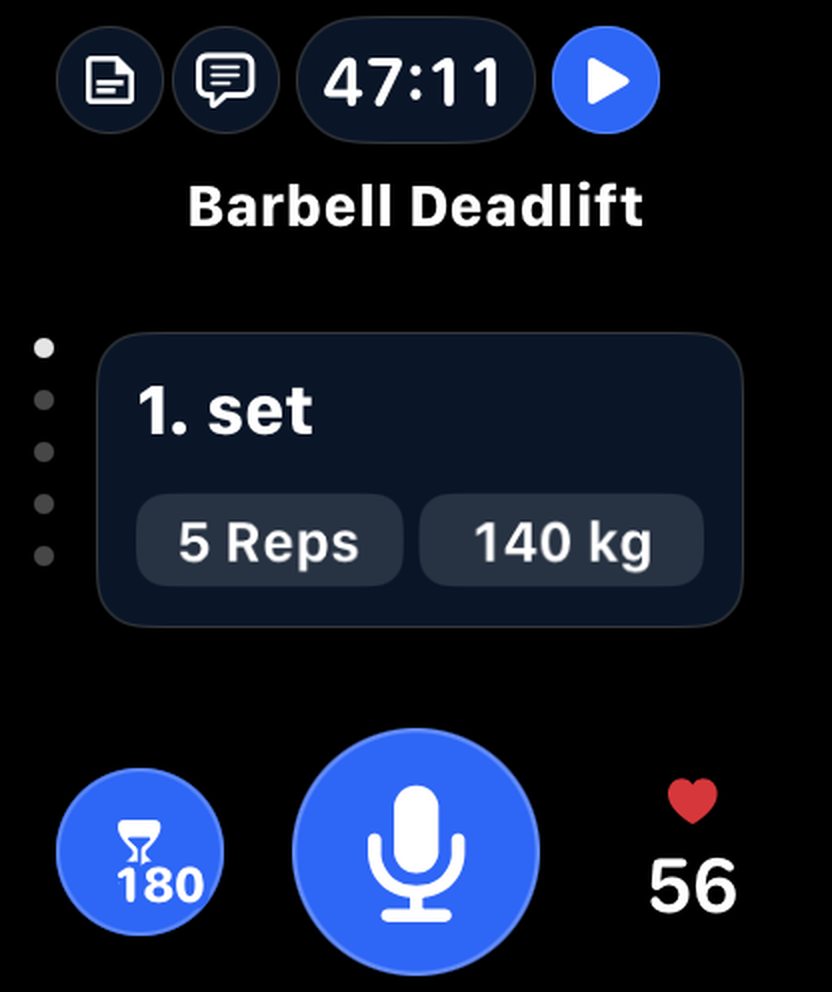
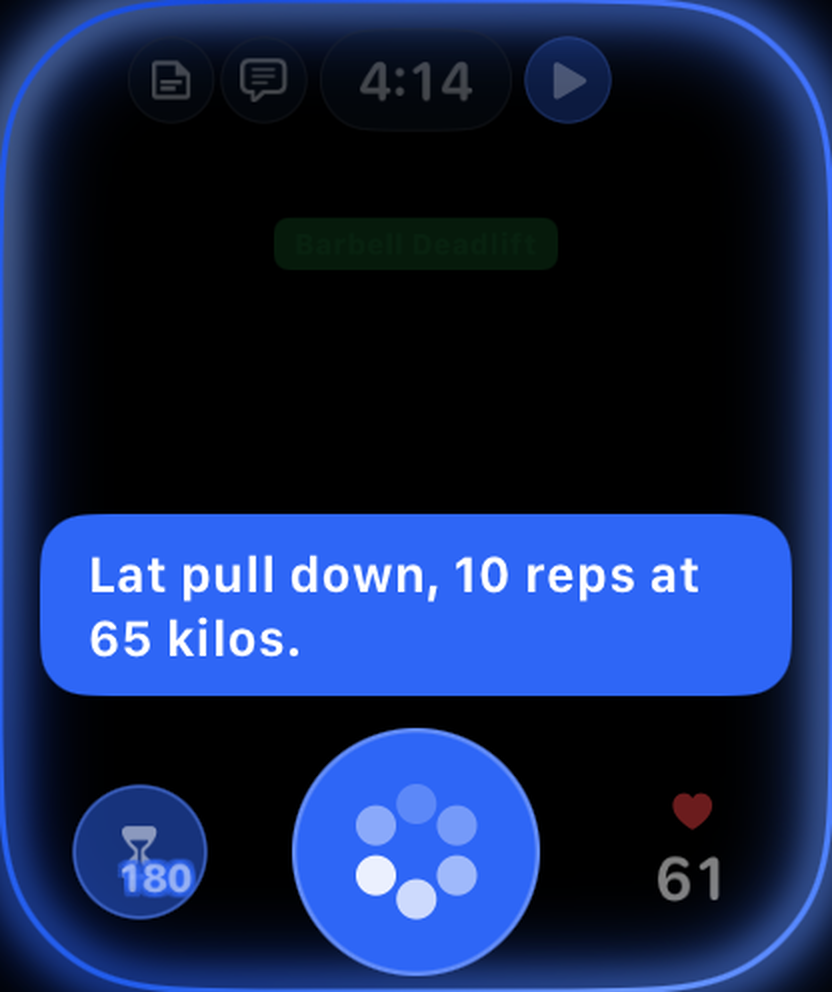
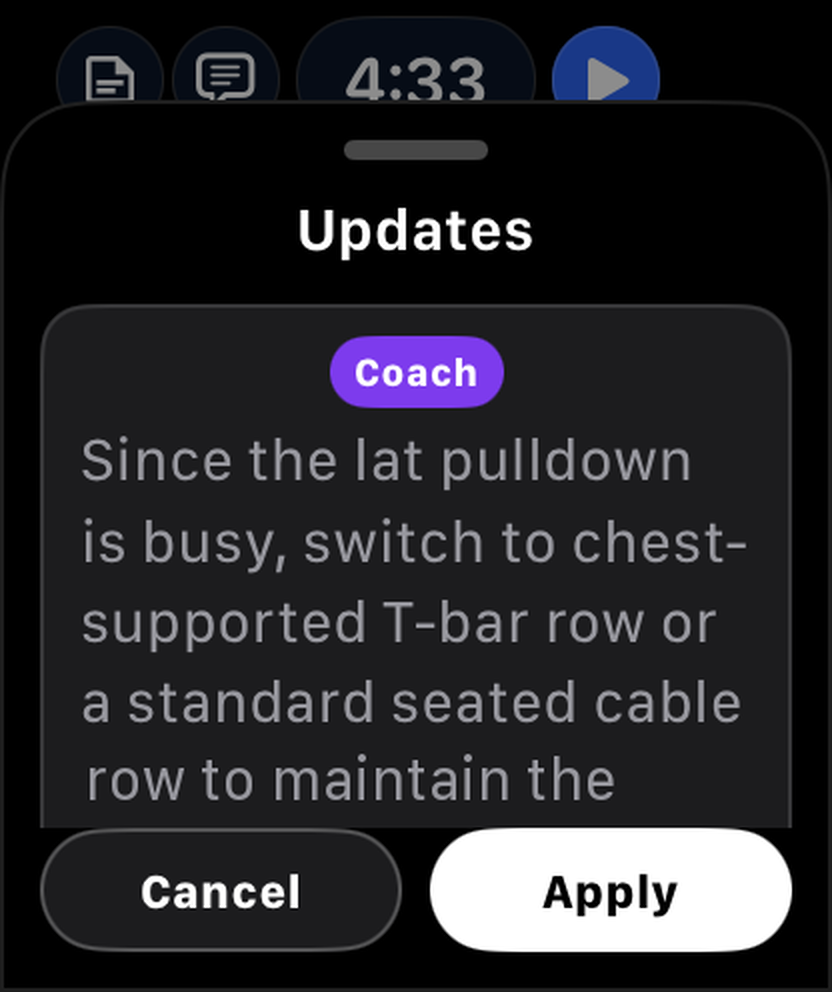
On the watch, synced with your iPhone, you get:
- Talk to log: tap the mic and say the set; it’s logged in seconds.
- Double-tap finger gesture to complete a set: without touching the watch, tap the index finger and thumb of your watch hand together twice — the set is marked done and your rest timer starts automatically (Apple Watch Series 9 or later, Ultra 2 or later, SE 3rd generation).
- Progressive overload on the wrist: when a workout starts or you add an exercise, the coach fills in today’s weight and reps from your past sets — more weight once you’ve earned it, otherwise one more rep — and the same card shows on the watch.
- Coach on your wrist: your coach’s suggestions arrive mid-workout, and you apply them with a tap.
- Full control at a glance: sets, reps, weight and heart rate on one screen.
- Rest timer: a countdown with your heart rate on the same screen.
- Music controls: play, pause and skip whatever’s playing without leaving your workout.
- One-tap controls: finish, pause or cancel the workout.
On the iPhone, the AI coach builds programs and plans sessions when you ask, using your real training log rather than a generic template, and it reads the notes you leave on sets (“left shoulder felt tight”). Pick one of five coaching styles, from short and direct to warm and supportive. You can talk to log and chat with your coach in nine languages, and speech is transcribed on the device — recordings are never uploaded.
There’s more around the workout, too: 400+ exercises with 3D demos that highlight the muscles worked, reports for trends, muscle balance and recovery (sleep, HRV and resting heart rate from Apple Health), and equipment recognition (beta) — point the camera at a machine to see what you can do on it.
Download TalktoFit on the App Store or take the Apple Watch tour.
Downsides: it’s new, so there are few App Store ratings yet. Logging, the coach and the watch app need a Pro subscription, the watch app needs your iPhone nearby, and the app requires iOS 27.
Hevy: best free logger
- Best for
- Most people who want a capable logger without paying
- On the watch
- Log sets, rest timer, live heart rate, finish the workout
- Price
- Free with limits; Pro $23.99/year or $74.99 lifetime (monthly also available)
Hevy’s free plan covers unlimited workouts with no ads, and the watch app lets you log sets, run the rest timer and finish a session without touching your phone. Workouts recorded away from the phone save once the watch reconnects. There’s a social feed if you like training with friends.
Downsides: the free plan caps routines (four) and custom exercises, and its built-in program builder is Pro-only. Supersets have to be set up on the phone.
Strong: fastest tap logging
- Best for
- People who want a simple, quick logger and nothing else
- On the watch
- Full logging with or without the iPhone, automatic rest timer, heart rate, live sync
- Price
- Free with limits; Pro $4.99/month, $29.99/year or $99.99 once
Strong has been the default “just let me log” app for years, and its Apple Watch app is fully featured: edit weight and reps, an automatic rest countdown, heart rate, and live sync so the same workout is on both devices. It works without your iPhone too.
Downsides: no coaching or programming help, the free plan allows only three routines, and charts need Pro.
SmartGym: best standalone watch app
- Best for
- Training with only your watch, and AI-built routines
- On the watch
- One-tap set logging, haptic rest timer, heart-rate zones, Action Button support on Ultra
- Price
- Free with tight limits; Premium+ $9.99/month or $59.99/year
SmartGym’s watch app runs fully on its own — no phone, no internet — and it’s one of the most polished on the platform. On Apple Watch Ultra the Action Button can log a set or start your rest. Version 8 (September 2026) added creating a workout by describing it in plain language, and its Siri support can log the next planned set.
Downsides: the free plan is very limited (two routines).
Fitbod: best for AI-planned workouts
- Best for
- People who want the app to decide what to lift today
- On the watch
- Log sets, rest timer and heart rate once a workout is started
- Price
- $15.99/month or $95.99/year; 7-day trial, no free tier
Fitbod builds each workout for you from your equipment, recovery and history, and adjusts as you go. It’s a good choice if planning is the part you find hardest.
Downsides: it’s one of the pricier apps here, and the watch app is a companion — keep your iPhone nearby to swap exercises and save the workout. See our Fitbod alternatives.
Gymaholic: best budget watch-first logger
- Best for
- Apple fans who want a cheap logger built around the watch
- On the watch
- Start and log workouts, swap exercises, heart rate, set recommendations
- Price
- $3.99/month or $31.99/year; 7-day trial
Gymaholic has focused on Apple Watch for a long time: you can start, log and finish workouts on the watch without your phone, replace exercises from the wrist, and get set recommendations. Its library has 850+ exercises with 3D animations.
Downsides: a smaller community than the big loggers, and the current version requires iOS 27.
Apple Workout: best free option for heart rate and rings
- Best for
- People who only want heart rate, calories and ring credit
- On the watch
- Strength workout types, custom workouts, Workout Buddy voice encouragement
- Price
- Free, built in
Start a Traditional or Functional Strength Training workout and your watch tracks heart rate, calories and time. In watchOS 27, Workout Buddy can talk you through a strength session with encouragement and a summary (it needs an Apple Intelligence iPhone and headphones, in a limited set of languages).
Downsides: no exercises, sets, reps or weights, so there’s no history to progress from. Many people run it alongside a logger, or pick one that saves workouts to Apple Health, such as TalktoFit.
Ladder: best for coach-built programs
- Best for
- Following a coach’s daily program instead of writing your own
- On the watch
- Hands-free workout controls, heart rate and calories
- Price
- $29.99/month or $179.99/year; 7-day trial, no free tier
Ladder gives you a new workout each day from a coach-led program, with in-ear audio coaching and video demos. If structure and motivation are what you’re missing, it delivers both.
Downsides: the most expensive app in our main list, you follow Ladder’s programming rather than your own, and it isn’t clear how much you can log from the watch.
Also worth a look
- Motra (formerly Train Fitness) detects exercises and counts reps from your wrist’s motion — interesting if you hate logging altogether.
- Gentler Streak doesn’t log sets, but it’s an excellent recovery and readiness companion to pair with any logger.
- Future pairs you with a real human coach ($199/month) who programs your training and sees your watch data.
- Apple Fitness+ ($9.99/month or $79.99/year) is great for follow-along strength classes, but it isn’t a gym log.
Which one should you choose?
- You want your hands free between sets, and a coach that plans with you: TalktoFit.
- You don’t want to pay: Hevy, or Strong if you only need a few routines.
- You leave your phone in the locker: SmartGym, Strong or Gymaholic.
- You don’t know what to train today: Fitbod, TalktoFit’s AI coach, or Ladder if you want a human coach’s program.
- You only care about heart rate and rings: Apple’s Workout app.
FAQ
Can Apple Watch track weightlifting on its own?
Partly. The built-in Workout app tracks heart rate, calories and time for strength workouts, but it doesn’t record exercises, sets, reps or weight. For that you need a third-party app — see how to track weightlifting on Apple Watch.
Does Apple Watch count reps?
Not with Apple’s own app. A few third-party apps, such as Motra, count reps from wrist motion; most loggers have you confirm each set with a tap. In TalktoFit you say the set, or complete it with the double-tap finger gesture (index finger and thumb tapped together twice).
Which apps work without an iPhone nearby?
SmartGym runs fully standalone, and Strong, Hevy and Gymaholic let you log on the watch alone and sync later. TalktoFit and Fitbod need your iPhone nearby.
What’s the best Apple Watch app for logging weights hands-free?
Our pick is TalktoFit: you tap the mic once and say the set (“bench press, 8 reps at 80”), or complete it with the double-tap finger gesture, so you rarely touch the screen mid-set. Hey Trainer adds a wake word on the iPhone, but on the watch you still tap to speak and its iPhone app must be running; it’s also English-only and processes audio in the cloud. If you need to train without your iPhone, SmartGym is the best tap-based alternative.
Which Apple Watch workout apps have an AI coach?
In TalktoFit, the coach’s suggestions and today’s weight and rep targets appear on the watch, and on the iPhone you can ask it to build a program or plan a session. Fitbod and SmartGym generate workouts with AI, and Gymaholic gives set recommendations on the watch.
Can I log sets by voice?
As of October 2026, none of the big strength loggers (Strong, Hevy, Fitbod, SmartGym) or Apple’s Workout app advertises logging a set by saying it in your own words. SmartGym’s Siri support can log the next planned set, and a handful of newer apps, TalktoFit among them, are built around voice logging — we compared them in the best apps to log workouts by voice.