
Apple Watch is great at tracking runs, but lifting is different: what matters is the exercise, the sets, the reps and the weight. Here’s how to track a strength workout with the built-in Workout app in watchOS 27, what it does and doesn’t record, and how to log the rest.
The short version: start a Traditional Strength Training workout to track heart rate, calories and time, and rate your effort at the end. Apple Watch doesn’t record exercises, sets, reps or weight — for that you need an app such as TalktoFit, where you log each set by saying it.
How to start a strength workout
- Open the Workout app on your Apple Watch.
- Turn the Digital Crown to Traditional Strength Training or Functional Strength Training. If you don’t see them, scroll down, tap Add and pick from the full list.
- Tap the workout (or the Play button) to start. On Apple Watch Ultra you can also press the Action button, or ask Siri.
- To pause, swipe right and tap Pause, or press the side button and Digital Crown together.
- To finish, swipe right, tap End, rate your effort, then tap Done.
Traditional or Functional Strength Training?
Apple doesn’t publish definitions for the two types. A sensible rule: use Traditional Strength Training for free weights and machines — squats, bench press, rows, curls — and Functional Strength Training for dynamic, bodyweight or circuit-style work. Picking the closest type helps Apple estimate calories.
What Apple Watch tracks while you lift
- Heart rate, active calories and elapsed time, shown when you raise your wrist. You can choose which views and metrics appear in the Workout app’s settings for each workout.
- Effort: for cardio, Apple estimates effort automatically, but for strength training you rate it yourself on a 1–10 scale at the end. You can add or edit it later in the Fitness app on iPhone (Sessions → the workout → Effort).
- Training Load: the Fitness app compares your last 7 days with the previous 28, weighting each workout by effort and duration — so rating your strength sessions helps them show up properly.
Use custom workouts for circuits and rest
Custom workouts work with strength training types. You can build a warm-up, repeating work and recovery intervals (timed or open) and a cool-down — handy for circuits, EMOMs or keeping rest periods honest. On the watch, open a workout’s options, then Goals → Custom → Add, or create one in the Fitness app on iPhone. Intervals are based on time, not reps.
Workout Buddy for strength training
Workout Buddy talks to you during a workout with encouragement and milestones, then gives a spoken summary at the end. It supports both strength training types. You’ll need:
- watchOS 27, paired with an Apple Intelligence iPhone (iPhone 15 Pro or iPhone 16 models and later)
- Bluetooth headphones
- Your device and Siri language set to English or Spanish
It works without your iPhone nearby if your watch has Wi-Fi or cellular. To turn it on, go to the workout’s Alerts, then Workout Buddy, and pick a voice. It speaks to you; it doesn’t log anything.
What Apple Watch can’t do (yet)
The built-in apps don’t log exercises, sets, reps or weight, and Apple Watch doesn’t count reps. There have been reports of per-set fields in watchOS 27 beta code, but nothing has shipped or been documented by Apple. Without a log, you have no history to progress from — and progression is what drives long-term gains (see our guide to progressive overload).
How to log sets, reps and weight on Apple Watch
For that you need a third-party app. Most let you tap your sets in on the watch; we compared them in the best workout apps for Apple Watch. Here’s how it works in TalktoFit, where you barely have to tap:
- Start your workout on your iPhone. The coach fills in today’s weight and reps for each exercise from your past sets — more weight once you’ve hit the top of your rep range, one more rep otherwise.
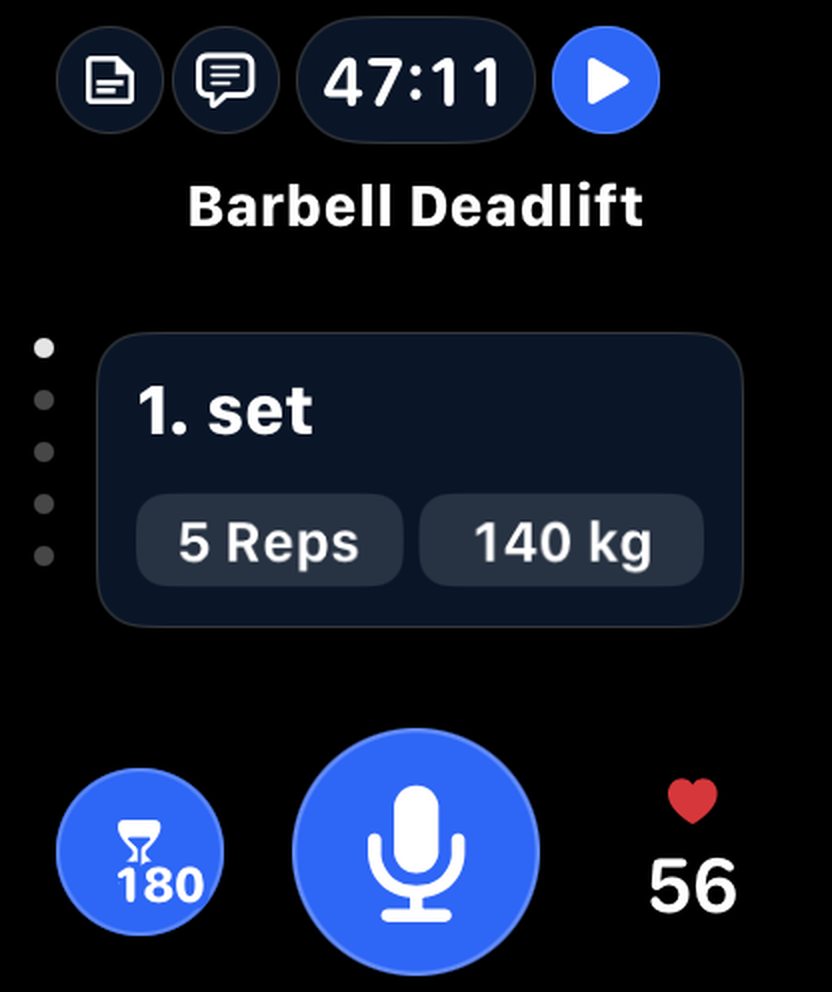
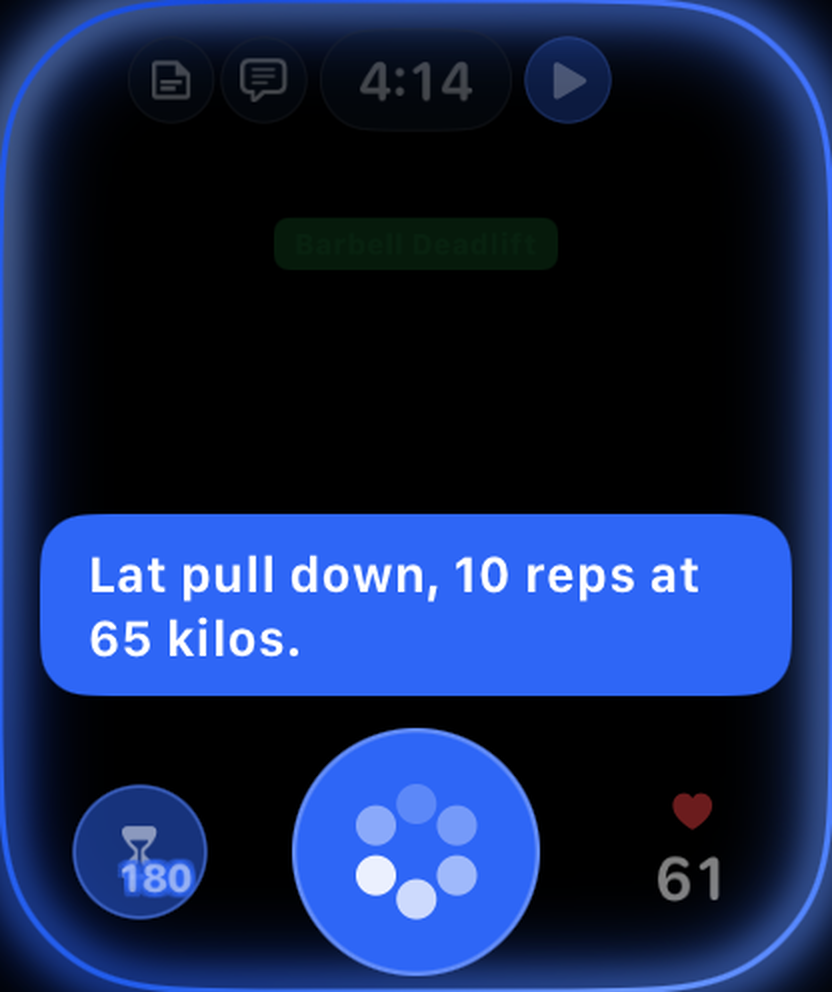
- Do your set, then say it. Tap the mic on your watch and say “Lat pulldown, 10 reps at 65 kilos”. It’s logged in seconds, in any of nine languages.
- Or use the double-tap finger gesture. If the set matches the target, tap the index finger and thumb of your watch hand together twice: the set is completed and your rest timer starts automatically (Series 9 or later, Ultra 2 or later, SE 3rd generation).
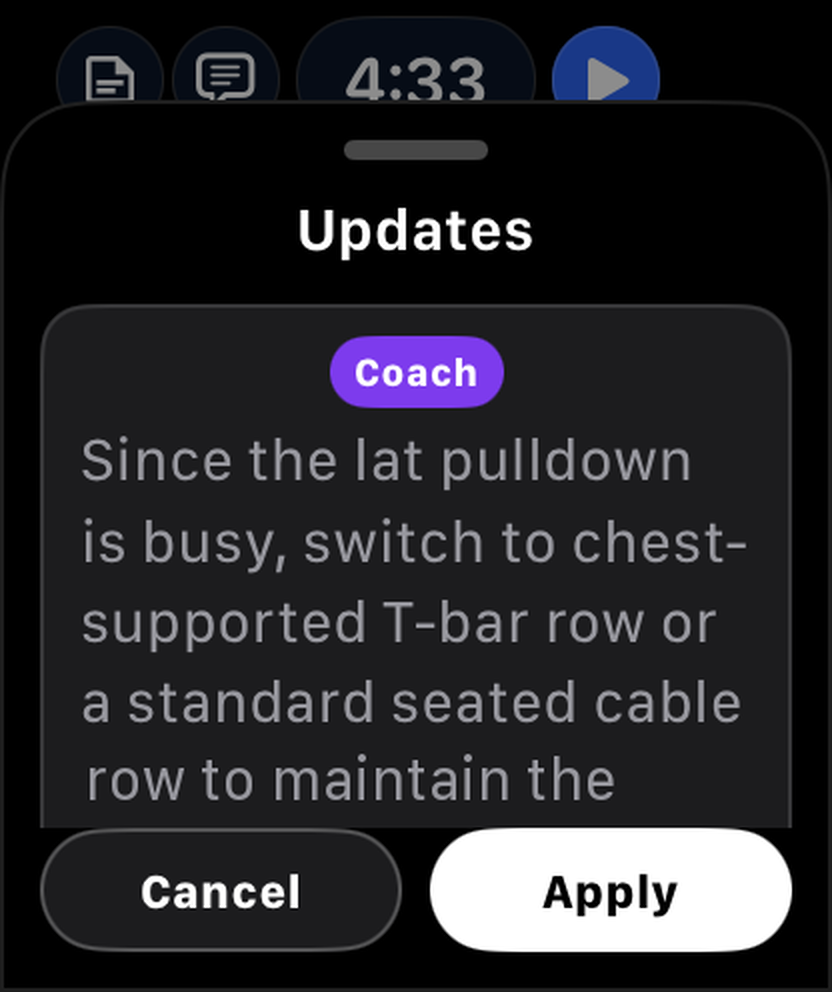
- Rest with your heart rate on screen. The rest timer and heart rate share one screen, and the coach’s suggestions arrive mid-workout to apply with a tap.
- Finish. End the workout from the watch; it’s synced with your iPhone and can be saved to Apple Health.
TalktoFit’s watch app works with your iPhone nearby and needs a TalktoFit Pro subscription. Download it on the App Store or take the Apple Watch tour.
Tips for accurate heart rate while lifting
- Wear the watch snug on top of your wrist, and tighten the band for workouts.
- Apple notes that irregular movements read less reliably than steady, rhythmic exercise, so expect some jumps during heavy sets.
- Tattoos and cold skin can interfere with the sensor.
- For the most reliable numbers, pair a Bluetooth chest strap.
- Keep your height, weight and age up to date in the Health app for better calorie estimates.
FAQ
Does Apple Watch count reps?
No, not with Apple’s own apps. Some third-party apps estimate reps from wrist motion; others, like TalktoFit, let you log the set by saying it or complete it with a double-tap finger gesture.
Which workout type should I use for weightlifting?
Traditional Strength Training for free weights and machines; Functional Strength Training for dynamic, bodyweight or circuit-style sessions.
Can I see my sets and weights on Apple Watch?
Not in Apple’s Workout app. Strength apps such as TalktoFit show the exercise, set, reps, weight and heart rate on one screen.
Do I need my iPhone with me?
Not for Apple’s Workout app. Workout Buddy works without the iPhone if your watch has Wi-Fi or cellular. Third-party apps vary: some are standalone, while TalktoFit’s watch app needs your iPhone nearby.
Sources
- Apple Support. Start a workout on Apple Watch. support.apple.com
- Apple Support. Create a custom workout on Apple Watch. support.apple.com
- Apple Support. Customize workout views on Apple Watch. support.apple.com
- Apple Support. Use Workout Buddy on Apple Watch. support.apple.com
- Apple Support. Track your training load on Apple Watch. support.apple.com
- Apple Support. Heart rate data on Apple Watch. support.apple.com